
Third-party risk, continuously scored.
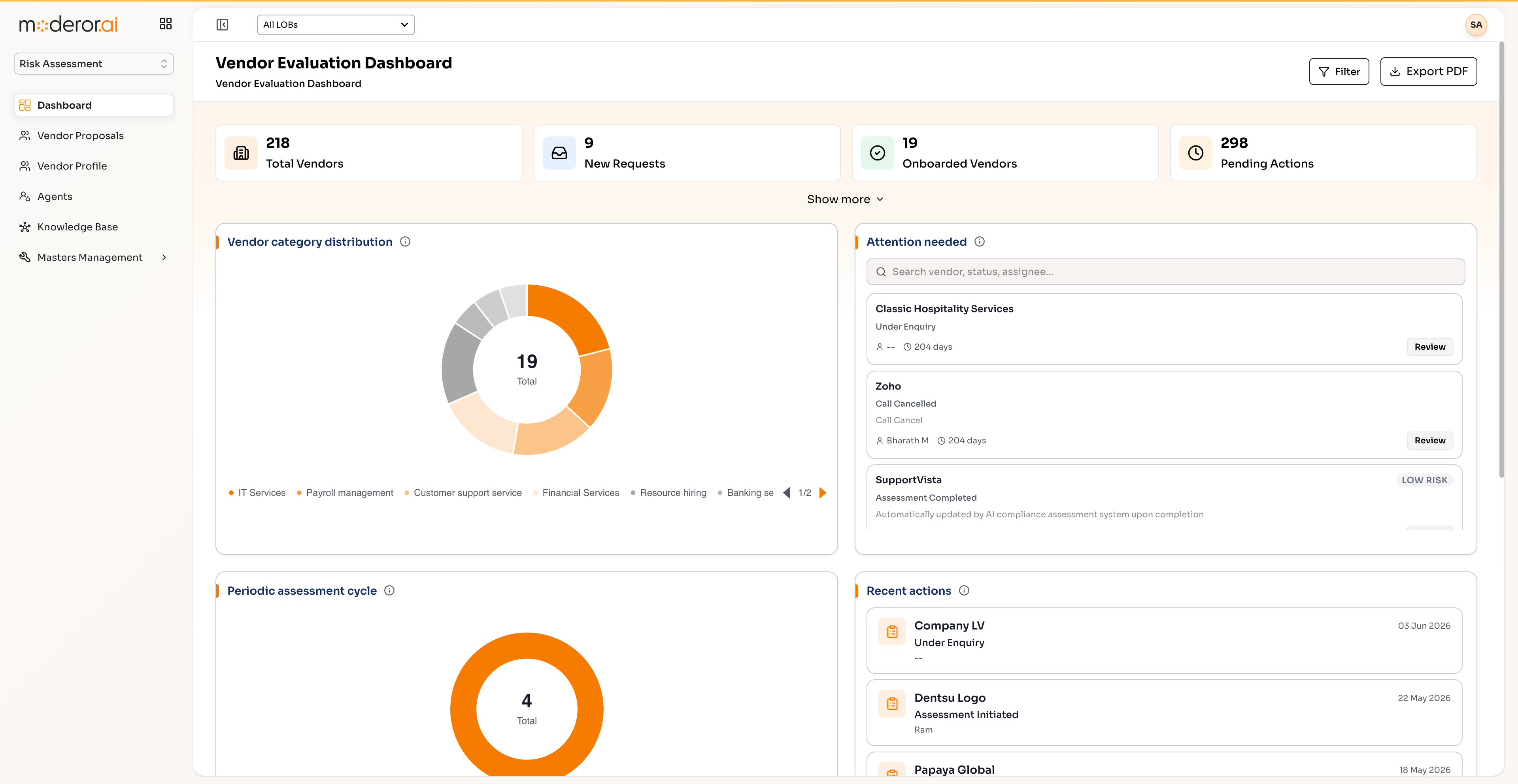
Manage the full vendor lifecycle — 218 vendors, 310 proposals with criticality and risk scores — through onboarding, periodic assessments and an attention-needed queue updated automatically by AI.
Moderor Risk Assessment is a vendor and third-party risk management product. It scores vendor proposals by criticality and risk, runs onboarding pipelines and periodic assessments, and maintains an AI-updated attention queue.
- 218 VENDORS UNDER REVIEW
- 310 PROPOSALS SCORED
- AI-UPDATED ATTENTION QUEUE
- PERIODIC ASSESSMENT PIPELINE
Capabilities
/ FEATURESVendor lifecycle pipeline
From proposal to onboarding to periodic reassessment — every vendor tracked with criticality and risk scores.
AI attention queue
An attention-needed queue is updated automatically by AI as risk signals change, so reviewers start with what matters.
Assessment scheduling
Periodic assessments and call booking keep reassessment cadence enforced rather than aspirational.
Risk scoring
310 proposals carry criticality and risk scores that feed dashboards and downstream GRC controls.
By the numbers
/ PROOFQuestions, answered
FAQWhat does Moderor Risk Assessment cover?
It covers the third-party risk lifecycle: vendor proposals with criticality and risk scoring, onboarding pipelines, periodic assessments, call booking and an attention-needed queue that AI keeps current.
How does the AI attention queue work?
Agents watch vendor risk signals and automatically surface vendors needing review, so analysts triage a ranked queue instead of scanning all 218 vendors.
Does it integrate with the rest of GRC?
Yes — vendor risk feeds the same approval and action pattern as CCM, and vendor-access controls appear in the shared audit control library.
More from GRC Suite
/ RELATEDContinuous Compliance Monitoring
AI agents that evaluate every asset against every control, continuously.
View product →GRC SUITEAuditor Workbench
Plan, execute and track hundreds of audits with planned-vs-actual analytics.
View product →GRC SUITESmart Alert Triage (ICAT)
ML-driven triage for T&E and procure-to-pay with measured false-positive reduction.
View product →See it on your data.
Connect a source over MCP, point an agent at a control set, and watch the first findings arrive — with you in command.