
Test data without the production risk.
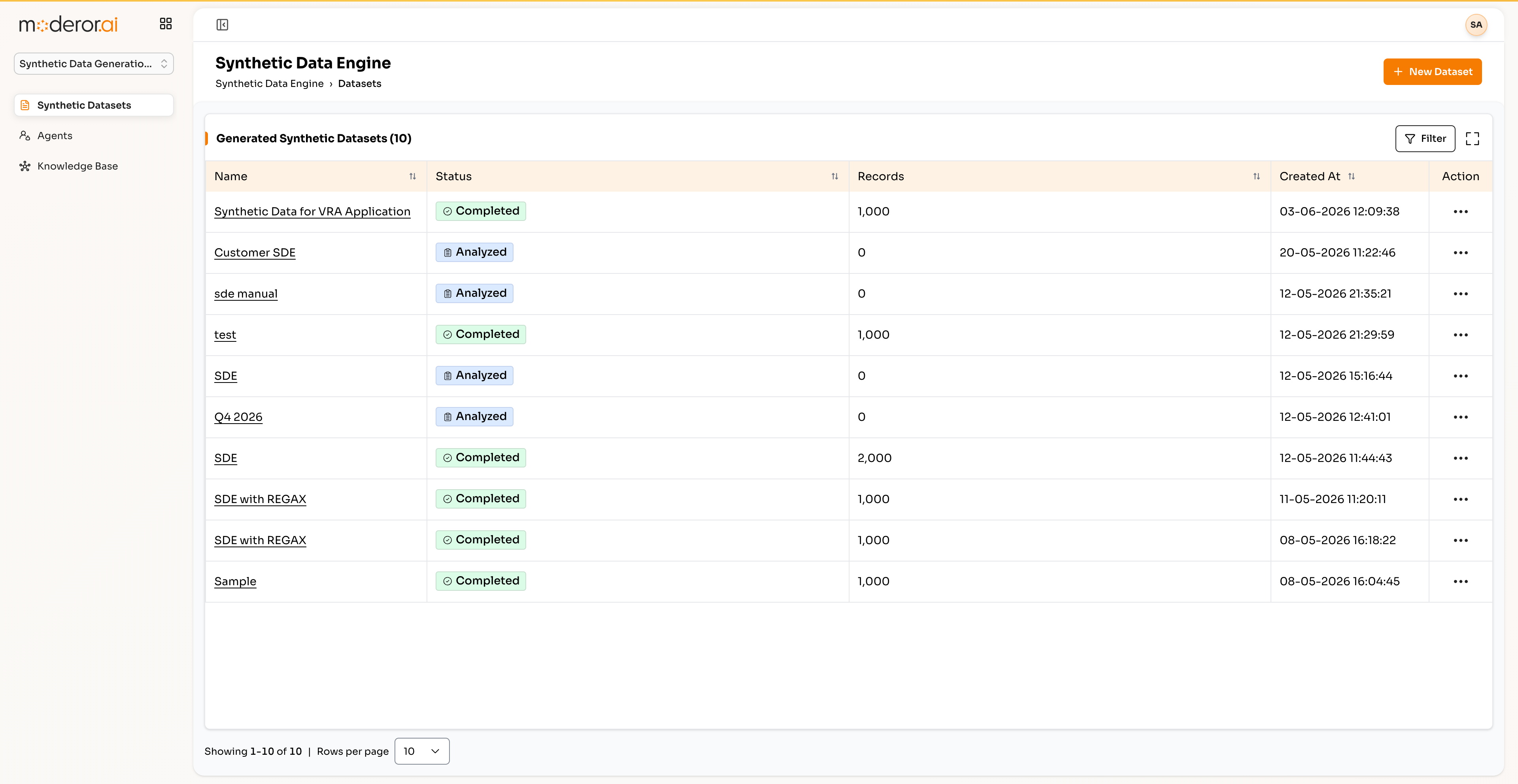
Generate synthetic datasets — 10 datasets of 1,000–2,000 records each — through an analyze → complete lifecycle, including regex-constrained generation for realistic field formats.
The Synthetic Data Generation Engine is Moderor's test-data product. It generates synthetic datasets through an analyze → complete lifecycle, with regex-constrained generation so fields match real formats without exposing production data.
- 10 DATASETS GENERATED
- 1,000–2,000 RECORDS EACH
- REGEX-CONSTRAINED FIELDS
- ANALYZE → COMPLETE LIFECYCLE
Capabilities
/ FEATURESLifecycle generation
Datasets move through an explicit analyze → complete lifecycle, so generation is reviewable.
Regex constraints
Field-level regex constraints keep formats realistic — IDs, phone numbers, codes — without sampling production.
Volume on demand
Reference datasets run 1,000–2,000 records each; volume scales with need.
Privacy by construction
No production data leaves its boundary — synthetic data feeds QA Suite and App Builder safely.
By the numbers
/ PROOFQuestions, answered
FAQWhy use synthetic data instead of production copies?
Production copies leak PII and violate the same controls your GRC suite enforces. Synthetic datasets keep formats realistic — via regex-constrained generation — with zero production exposure.
How realistic is the generated data?
Field formats follow your regex constraints and the analyze step profiles target shapes, so IDs, codes and values look real to your applications and tests.
How does it fit the rest of APPcelerate?
Generated datasets feed QA Suite runs and App Builder prototypes, keeping the whole delivery loop production-data-free.
More from APPcelerate Suite
/ RELATEDAI BRD Generator
Business requirements documents generated from templates with AI quality rating.
View product →APPCELERATE SUITEAI App Builder
Describe an application and get working prototype code instantly.
View product →APPCELERATE SUITEVAPT
Scanner reports normalized into tracked vulnerabilities with SLA and exceptions.
View product →See it on your data.
Connect a source over MCP, point an agent at a control set, and watch the first findings arrive — with you in command.